A decision about one operation
An approval request is raised by an Agent capability that supports interactive approval. The initial Orbit implementation ran its file checks without an approval card. The later Mission requested a local HTTP server and did require approval; that actual request is shown below.
When a real request appears, compare its command or target with your task. Allow only the scope you intended, or deny and provide a safer alternative. A rejected request can leave earlier successful changes intact. Agents differ in what they can ask and which permission choices they expose.
A real approval during the Mission
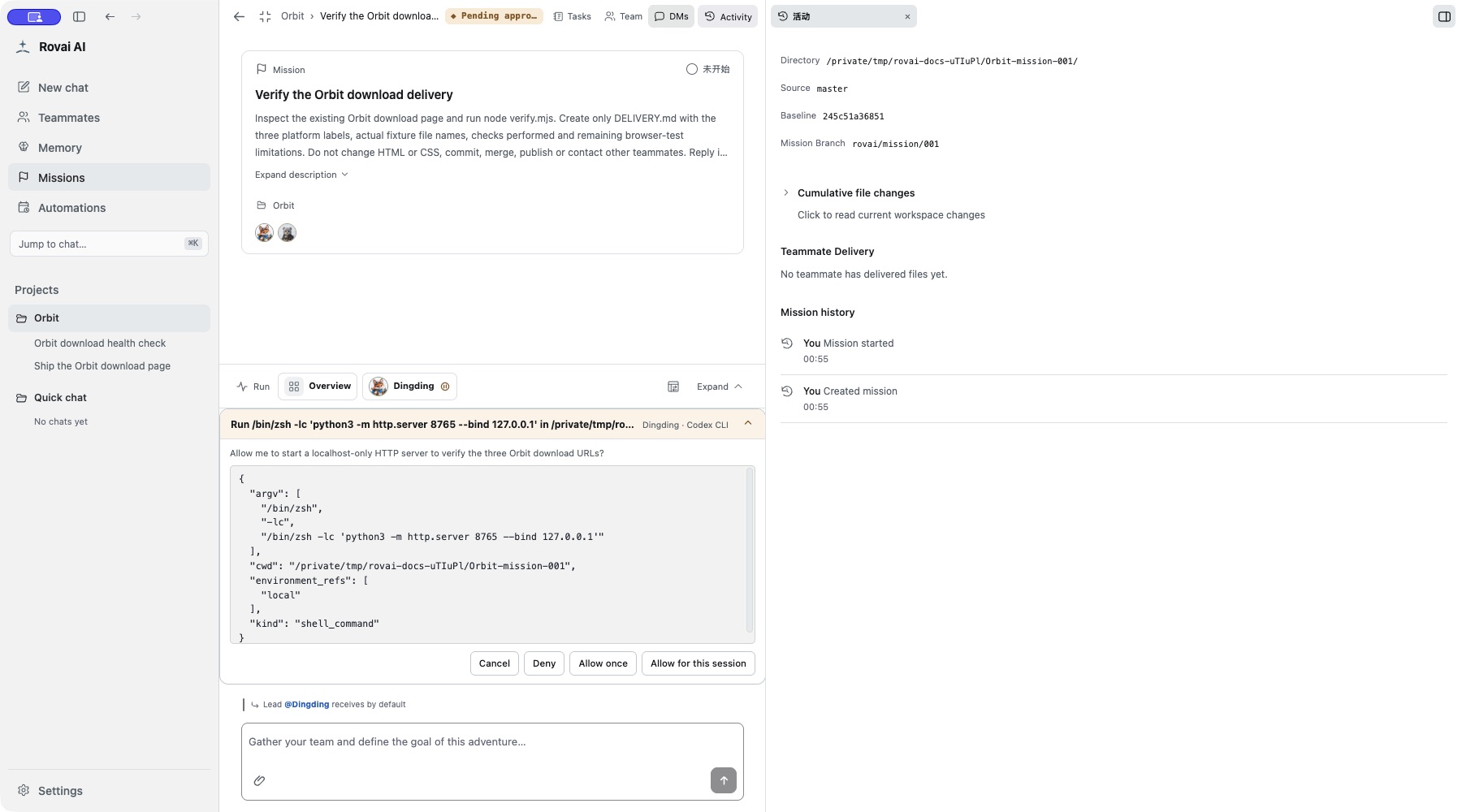
Resolve the operation, then observe progress
- Read the reason and full command. Here the target is the isolated Orbit worktree and the bind address is 127.0.0.1.
- Choose the native option matching your intended scope. This recording allowed only this invocation, not all future commands.
- Return to Run to see whether the operation resumed. The later output reported HTTP 200 for the page and three text fixtures. That checks HTTP responses, not visual browser layout.
How to use it
- When an Agent needs approval, open the pending approval area above the conversation composer or use the header’s pending indicator.
- Read the requested command or action and its supplied context. If several requests are waiting, move between them with the previous and next controls.
- Choose one of the options shown by that Agent. Decline or ask for clarification when the action does not match your intent.
Read before deciding
- Requested action
- Read the command, target or raw request. Identify the files, network destination or system action it affects.
- Context
- Compare the request with the task you gave and the run step that produced it.
- Native choices
- Choose among the options supplied by that Agent; wording and scope can differ between Agents.
- Multiple requests
- Use previous/next controls to inspect each request. A decision applies to the displayed request, not the whole batch.
Where approval appears
Pending approval is docked above the public composer, with an indicator in the conversation header. Private chat can also produce an approval request.
After deciding, return to the run. The Agent may still fail, be interrupted or produce a different outcome; the approval only resolves that request.