Responsibilities and data flow
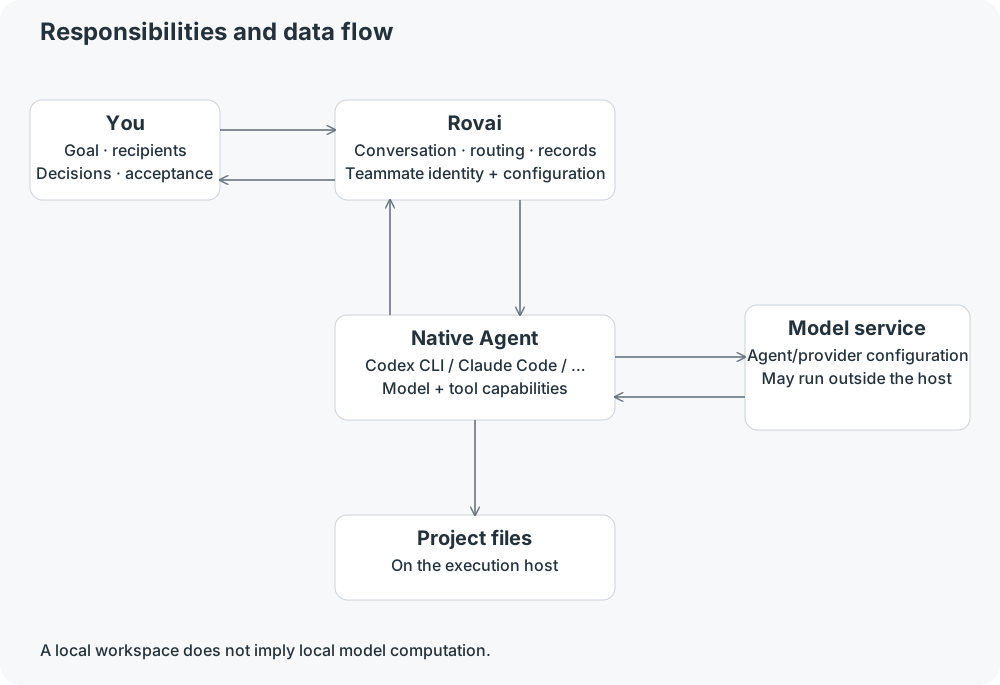
Five different roles
- You
- Set the goal, choose recipients, inspect output and decide whether to approve an operation or accept a delivery.
- Rovai
- Organize teammates and conversations, queue addressed messages, launch configured Agents and retain observable execution facts.
- Teammate
- A lasting identity with responsibilities and configuration. Several teammates can use the same Agent product with different roles.
- Native Agent
- Products such as Codex CLI or Claude Code interpret the request, call the configured model and use tools under their own capabilities and permissions.
- Project and services
- Files are on the execution host. Model requests follow the chosen Agent/provider configuration; a local workspace is not a guarantee that all inputs stay on the computer.
Follow one request
- Select Dingding in the mention picker and send a scoped request in the Orbit conversation.
- Rovai accepts the message and records a delivery for that teammate. When execution can start, it freezes the selected input and configuration into a Run.
- The Agent reads or edits files and returns observable steps and output. Read the public answer, the Run and the actual files together.
- To request review, select Cheese and send a new request. That creates new work; merely naming a reviewer in prose is not the same action.
What is shared, and what is separate
Participants in a project conversation work against its selected workspace. A private one-on-one has separate messages and a separate queue, but it does not automatically create an isolated file copy.
A Git-backed Mission can have a shared managed worktree. Its teammates use that Mission execution location together; each teammate does not automatically get a worktree.
Permissions and actual model support come from the current Agent configuration. A profile description, a Skill or an @ mention does not grant filesystem or network access.