How to use it
- Choose New conversation in the sidebar, then select or create the project for the directory you intend to use.
- Name the conversation so you can find it later, and choose at least one teammate to participate.
- Open the conversation from the project or recent list when you want to continue the same work.
New conversation dialog
Choose the working directory, participants and lead before beginning. The name is optional but useful for finding the work later.
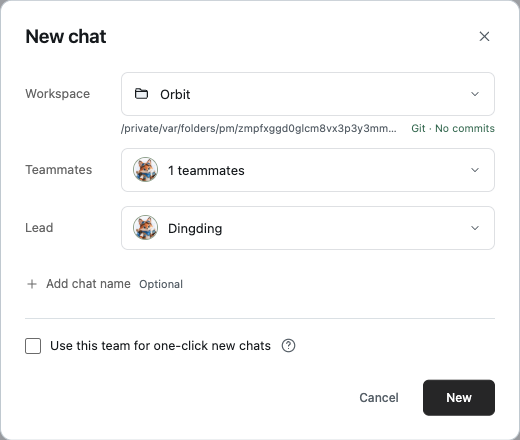
Creation choices
- Workspace or project
- The folder the Agent should work in. A project chat keeps this folder and its conversation together; Quick chat uses its managed directory.
- Teammates
- The people available to receive messages in this conversation. Add at least one.
- Lead
- The default recipient when you send without an explicit @ mention. Choose the lead from the selected teammates.
- Chat name
- A searchable title for the work. A short goal works better than a generic date.
Project chats and quick chats
Use a project when the task depends on a specific repository or folder. Before any file change, verify that the project path in the creation dialog is the one you intended.
Use Quick chat for a question that does not need a repository. When continuing work, reopen the existing conversation instead of creating a new one; its timeline, tasks and runs stay together.