A pair you can adapt
These are documentation profiles in an isolated example, not changes to Rovai’s default teammates. Start with stable responsibilities. Put “only edit index.html today” and this review’s acceptance criteria in the conversation request.
A personality tag describes collaboration style. A working principle describes a repeatable practice. Neither gives the Agent extra permissions. Save identity and Agent configuration separately.
Dingding · implementation
- Role
- Implementation
- Responsibilities
- Implement focused changes and explain the delivered files.
- Personality
- Practical, curious. Ask when a missing decision affects implementation.
- Working principles
- Read existing files first. Stay within scope. Verify the outcome and state what remains untested before handing work back.
- Growth focus
- Make implementation handoffs easier to verify.
- Agent configuration
- This example uses Codex CLI, the Agent’s default model, workspace-write and on-request. Use the capabilities actually offered by your Agent.
Cheese · review
- Role
- Review
- Responsibilities
- Inspect correctness, accessibility and edge cases; report findings with file locations.
- Personality
- Precise, candid. Distinguish a confirmed defect from a suggestion.
- Working principles
- Review independently. Do not invent defects. Do not edit unless asked. State browser or environment limits.
- Growth focus
- Turn each finding into a small, actionable request.
- Agent configuration
- Codex CLI with a read-only filesystem configuration and on-request approval. This limits file editing while preserving the reviewer’s identity.
Roster versus conversation team
The roster keeps the teammate available for future work. A conversation chooses who participates now and which member is lead. Editing a roster profile is not the same as inviting it to a conversation.
A conversation’s Team panel is the place to inspect membership and run configuration for the current work. Before removing a member, review the product’s affected-work preview and reassign unfinished responsibilities.
How to use it
- Open Teammates from the sidebar and select a person from the roster, or create a new teammate.
- Edit the name, team role, responsibilities, portrait, and working principles as needed. A new teammate can start with a name only.
- Choose Save teammate info. Run configuration has its own Save action lower on the same page.
Identity editor
The identity section is above Agent configuration. The two Save actions commit different changes.
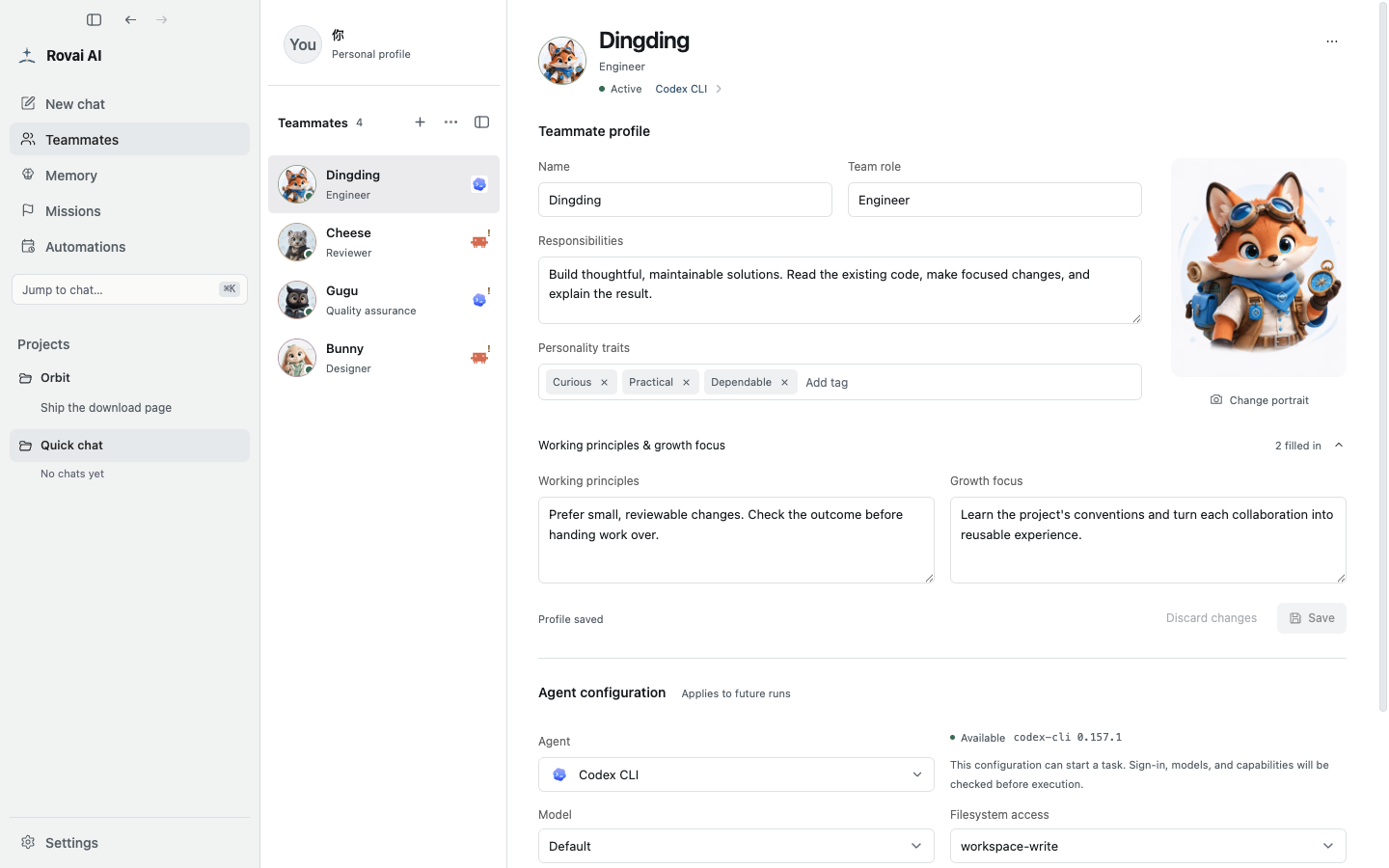
Every profile field
- Name
- The name shown in the roster, mentions and conversation messages. It is required; give teammates distinct, recognizable names.
- Team role
- A short label for the teammate’s place in the team, such as engineer, reviewer or designer. It helps people choose who to involve.
- Responsibilities
- Describe recurring work and expected deliverables. Write a durable scope, not one temporary task from a conversation.
- Personality traits
- Up to six short tags shape how the teammate presents and collaborates. They are not execution permissions.
- Portrait
- The avatar used to recognize the teammate in the roster, messages and run list. It has no effect on the Agent model.
- Working principles
- Stable rules for how this teammate approaches work, checks results and hands off work.
- Growth focus
- A longer-term capability or habit this teammate should improve through future collaboration.
Create, save and revise
A new teammate can be created with just a name. Add the role and responsibilities when you know what the person will do, then expand Working principles & growth focus only when you have something specific to say.
Save teammate profile commits identity fields. Scroll down and use the separate Agent configuration Save when you change the Agent, model or permissions. Look for the saved or unsaved state beside the relevant section.